Forest Management in Forest Studio
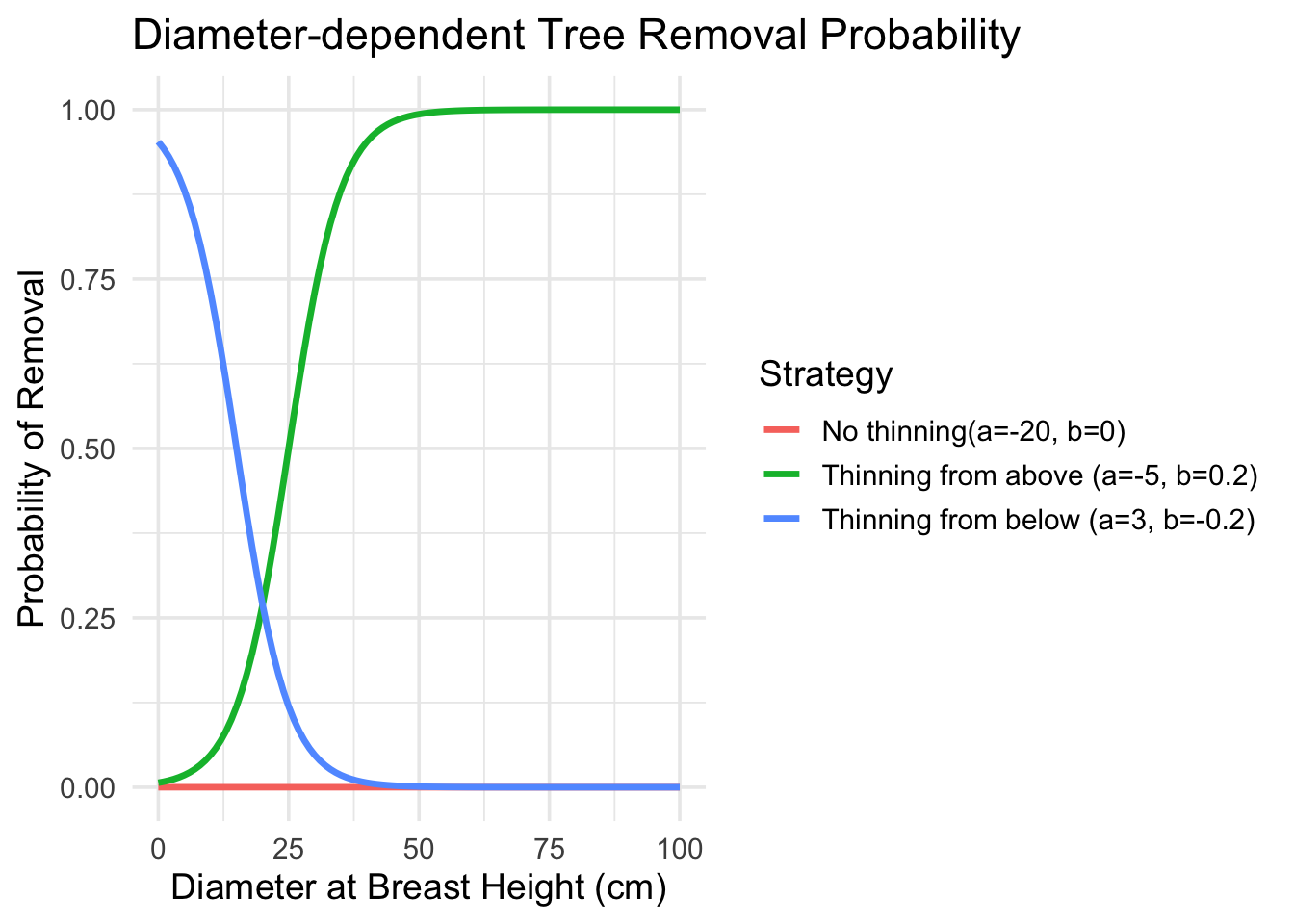
Instead of removing trees randomly, thinning follows clear rules. Each tree is given a probability of being removed based on its size (diameter). This makes the process systematic and repeatable, rather than arbitrary.
In forest management, thinning means selectively removing some trees so that the ones left behind have more space and resources to grow well. The approach described divides the forest into manageable units and uses a rule based on tree size: each tree gets a probability of being removed depending on its diameter. This lets you lean toward removing smaller trees (“thinning from below”) or larger ones (“thinning from above”), depending on your aim. The method also includes safeguards: for example, you only thin when the total basal area in a unit is high enough; you might force removal of a given species once it reaches a target size; and you ensure removal isn’t too heavy (to avoid harming forest structure) or too light (so the thinning has effect).
Thinning
In Forest Studio we can implement two types of thinning strategies at the Management Unit level
From Below: Focuses on removing smaller or weaker trees, giving more space to the strongest and tallest ones.
From Above: Removes some larger trees to favor the growth of smaller, younger trees.
It is also possible to do partial cuttings without favoring large or smaller tree sizes.
All of this is done via a diameter-dependent tree removal probability curve that is defined by two parameters a and b.
Quick Parameter Guide
| Strategy | Typical a range | Typical b range | Effect |
|---|---|---|---|
| Thinning from Above | -8 to -3 | 0.05 to 0.15 | Targets larger trees |
| Thinning from Below | 0 to 5 | -0.3 to -0.1 | Targets smaller trees |
| Neutral | -5 to 0 | -0.05 to 0.05 | Size-independent |
Constrains to management
Management Unit constraints
Minimum Basal Area: Thinning only happens when the stand is dense enough—meaning the total area covered by tree (basal area) exceeds a threshold.
Harvesting intensity Limits: The proportion of amount of wood removed is capped so the forest isn’t over-thinned or destabilized (Max intensity), but we have also set a minimum proportion to be removed to avoid cutting every year in the same MU for economic reasons (Min intensity).
Type of harvesting method: You can decided if the harvesting is a manual harvest (chainsaw) or it is done with a harvester. This will have an impact on the removal costs but not on the volumes removed.
Species specific constraints
Certain species can be prioritized or limited—for example, removing trees of one species once they reach a set diameter.
Large-wood: The thinning strategy preserves the large-wood component by maintaining a minimum proportion of large-wood species (e.g., oak, beech) after thinning.
The target diameter for these species is set to 50 cm, ensuring that individuals exceeding this threshold are retained.Target diameter: Species-specific diameter thresholds that, when exceeded, trigger tree removal. We set the target diameter to 0 cm for all other species except the main species of the stand. This implies that for these secondary species, the probability of removal equals 1, meaning they will always have a high likelihood of being harvested once other constraints are met.
Clear cut
The so-called “Rotation Forest Management” strategy allows for an entire management unit (MU) to be harvested in one go — a clear-cut. Then, the area is re-planted with a target species at a defined density.
Trigger Conditions
A clear-cut happens when a user-defined year in the simulation is reached (
year_clearcut) regardless of the stand’s actual age.If triggered, all trees in that management unit are removed.
The basal area removed equals the total basal area of the management unit.
Post-Harvest Planting
After the clear-cut, a new stand is established by planting trees of a defined species (
species_id) in the same year. It is possible to plant more than one species.Planting density is defined (trees per hectare).
The trees are planted uniformly across all cells in the management unit; all newly planted trees are assumed to be at age 0, with a diameter at breast height (DBH) of 10 cm (or species-specific default).
Management Unit Variables & Definitions
| Variable | Meaning |
|---|---|
mu_i |
The management unit in which the clear‐cut and planting occur. |
planting_density (trees/ha) |
Number of trees planted per hectare after the clear‐cut. |
year_clearcut |
The simulation year when the clear‐cut is triggered (independent of stand age). |
Variables in the management scenario tables
Management unit
| Column Name | Description |
|---|---|
| MU ID | Unique MU identifier |
| A | Intercept parameter (thinning curve) |
| B | Slope parameter (thinning curve) |
| Basal Area | Minimum BA to consider thinning; also the lower limit for MU basal area |
| Min Intensity | Minimum harvest intensity (proportion of BA removed) |
| Max Intensity | Maximum harvest intensity |
| Manual Harvest | Boolean affecting cost calculation (TRUE = manual harvest) |
| Actions | Visualize thinning curve for different A and B |
Species Specific
| Column Name | Description |
|---|---|
| MU ID | Management unit identifier |
| Species | Species receiving parameters |
| Large Wood | Minimum proportion of trees with DBH ≥ 50 above which removal of large trees is allowed |
| Target Diameter | Minimum Diameter above which probability of removal is set to 1 (actual removal depends on minimum basal area for that MU). |
Clear Cut
| Column Name | Description |
|---|---|
| MU ID | Management unit identifier |
| Year | Years from one to the duration of the simulation which to perform clear cut for that MU |
| Density | Trees per hectare to plant after clearcut |
| Species | Species to be planted |